Home > Fundamentals of Applying Textures

Wes McDermott

Principal Director, Substance 3D Worldwide Evangelism

linkedin-icon

Fundamentals of Applying Textures

Core texturing concepts including how to apply, manipulate, and visualize materials on 3D models using Painter's non- destructive layer workflow

This summary is AI generated

Learning Outcomes:

Learning outcomes not available.

Level: Advanced

Skills you'll gain:

Skills not available.

Key Insights

Key insights not available.

Learning outcomes

Learning outcomes not available.

Key insights

Key insights not available.

Skills

Skills not available.

Transcript

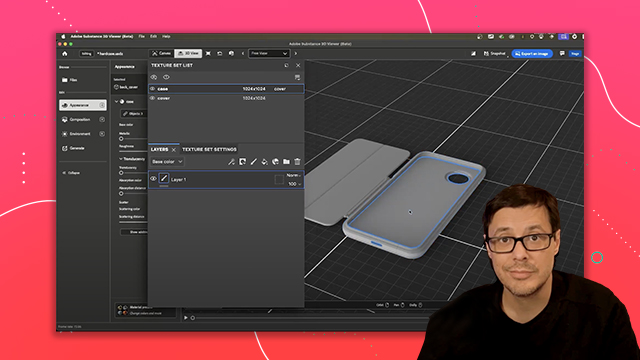
[00:00:00] Talking about this cover material and

[00:00:00] its layer stack, there is a fundamental

[00:00:00] thing to understand with the types of

[00:00:00] layers you create in Substance Painter.

[00:00:00] There are two types, a paintable layer

[00:00:00] and a fill layer. So, with this cover,

[00:00:00] you'll see that the layer stack

[00:00:00] automatically has a layer that has this

[00:00:00] little paintbrush icon. And this is

[00:00:00] what's referred to as a paintable layer.

[00:00:00] It just means that you can paint

[00:00:00] directly on this layer. So, for example,

[00:00:00] if I come over to where the cover is and

[00:00:00] I start to paint, I can now paint

[00:00:00] directly on this cover. Now, I can paint

[00:00:00] on any surface that has this cover

[00:00:00] applied. However, if I move my mouse

[00:00:00] over to an area of the 3D model that has

[00:00:00] the mesh applied to the case material,

[00:00:00] as you can see here with the cover

[00:00:00] selected, notice I can't paint here. So,

[00:00:00] in this instance, you can't paint across

[00:00:00] materials. Now, Painter does have a more

[00:00:00] advanced feature set called UDIM, which

[00:00:00] does allow you to paint across these

[00:00:00] texture sets. However, that is a more

[00:00:00] complex topic that's not covered in this

[00:00:00] course. So, for now, just know that you

[00:00:00] have your material or texture set

[00:00:00] selected, you have a layer stack, and

[00:00:00] you can paint within that texture set.

[00:00:00] Now, with the layer selected, I'll have

[00:00:00] my properties panel that gives me my

[00:00:00] little brush stroke, and I have a

[00:00:00] material preview. And then I have these

[00:00:00] little buttons. And these buttons allow

[00:00:00] me to make changes to things like the

[00:00:00] brush and the material. That's another

[00:00:00] thing to understand about Painter.

[00:00:00] Whenever you have a brush, you're going

[00:00:00] to have a material associated with it.

[00:00:00] So with the brush tab, you can see I can

[00:00:00] scroll down through here and I can

[00:00:00] change all kinds of things. So for

[00:00:00] example, here, let me just undo this

[00:00:00] stroke. And if I add some things like

[00:00:00] the size jitter, and we'll say angle and

[00:00:00] position, you can see it's giving me a

[00:00:00] brush preview. And if I go into here and

[00:00:00] say like uh let's do something like

[00:00:00] adjust the size. We'll make it a little

[00:00:00] bit smaller. And I go to paint. You can

[00:00:00] see I'm basically creating a different

[00:00:00] type of brush that I'm using. Now, if we

[00:00:00] come over here to the material tab, this

[00:00:00] is going to be the material that I set

[00:00:00] up. And you'll see that there's some

[00:00:00] buttons here for the channels. These

[00:00:00] channels are set based on the template

[00:00:00] that you use when you create the

[00:00:00] project. So if you recall at the

[00:00:00] beginning of the video, we used the

[00:00:00] template ASM or Adobe standard material

[00:00:00] metallic roughness. So that's why we

[00:00:00] have color rough and metal channels. And

[00:00:00] if I want to change the color, I can

[00:00:00] just come over to the color. We'll click

[00:00:00] this swatch and I'll choose like say

[00:00:00] this red. And now if I come over here

[00:00:00] and I start to paint, I'm now painting

[00:00:00] with a red color. Now Painter excels at

[00:00:00] not just painting color, but painting a

[00:00:00] full material. So let's just undo these

[00:00:00] strokes that I have here and let's go to

[00:00:00] the color. Let's scroll down and let's

[00:00:00] take a look at this roughness. Now if I

[00:00:00] move this slider towards black, which

[00:00:00] means smooth here in my material

[00:00:00] preview, you can see I'm getting what

[00:00:00] looks like a glossy or reflective

[00:00:00] surface. And then if I take this

[00:00:00] metalness, this metal slider, and I pull

[00:00:00] it towards white, I'm telling the

[00:00:00] surface that, hey, this is a metal I

[00:00:00] want to create. And again, my material

[00:00:00] preview now looks like this metallic

[00:00:00] reflective sphere, kind of like a

[00:00:00] Christmas ornament. So, if I come over

[00:00:00] here and I start to paint now, you can

[00:00:00] see that I'm getting, and I'll zoom in

[00:00:00] so you can really see it. I'm now

[00:00:00] starting to get this metallic looking

[00:00:00] surface as I paint. And that is what a

[00:00:00] paint layer is. I set a material. I have

[00:00:00] a paintbrush. And now I can start to

[00:00:00] paint with it. Now, if I want to create

[00:00:00] some different brushes or use a set of

[00:00:00] different brushes, kind of like you'd

[00:00:00] pick a brush in Photoshop, I can come

[00:00:00] over here to my assets panel, this

[00:00:00] little asset tab here, and I can click

[00:00:00] here on this brush. Now, there's a

[00:00:00] little filter here saying base material.

[00:00:00] I'm just going to close that out. And

[00:00:00] now I can see I've got all types of

[00:00:00] brushes here. So, if I just grab a

[00:00:00] brush, and I'm just going to randomly

[00:00:00] pick one. Let's do this one here. Uh you

[00:00:00] can see this is a concept brush. So,

[00:00:00] we'll grab it. And now I have another

[00:00:00] brush that I can work with. And as I

[00:00:00] start to paint, uh, I get a brush here.

[00:00:00] And as I grab another one, let's see, I

[00:00:00] don't know, this one here, you can see I

[00:00:00] get again another brush. I can use the

[00:00:00] control or command key with the right

[00:00:00] mouse button and drag left and right to

[00:00:00] change the brush size. I could also use

[00:00:00] the left and right bracket keys. So

[00:00:00] those are some quick shortcuts to be

[00:00:00] able to change the size of the brush.

[00:00:00] So, why don't you take just a few

[00:00:00] moments here just kind of play around

[00:00:00] with this paint layer. Try uh come over

[00:00:00] here to the assets panel, grab some

[00:00:00] different brushes, maybe play around

[00:00:00] with just a few of these settings here.

[00:00:00] Uh, another thing that's pretty cool is

[00:00:00] I can even come over here to this height

[00:00:00] and increase this into a positive value.

[00:00:00] And then when I go to paint, this is

[00:00:00] actually going to look like uh a bit of

[00:00:00] a kind of a more of a 3D look to it. And

[00:00:00] again, I can just have fun by trying out

[00:00:00] these different brushes here. And if you

[00:00:00] want to try some of the uh you know

[00:00:00] changing or tweaking some of the brushes

[00:00:00] again you can do that here with your

[00:00:00] size flow and so on and so forth. And

[00:00:00] you can just kind of have fun use the

[00:00:00] cover of this phone as kind of like a

[00:00:00] blank canvas and just take a little bit

[00:00:00] to get yourself familiar with picking

[00:00:00] different brushes and choosing different

[00:00:00] values here for your material. Okay. So

[00:00:00] I hope you had some fun playing around

[00:00:00] with some brushes and material colors.

[00:00:00] And so what you're seeing here, this is

[00:00:00] what we're going to be doing in the next

[00:00:00] step. So now that you see where we're

[00:00:00] going, let me show you how to get there.

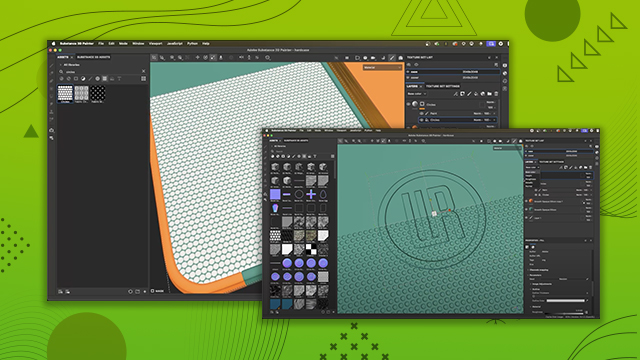
[00:00:00] Now, we're going to apply a material, a

[00:00:00] pre-made material to this cover. Now,

[00:00:00] over here in the assets, we have lots of

[00:00:00] materials that ship with Substance

[00:00:00] Painter, and you can start with any of

[00:00:00] these, but I want to show you how to use

[00:00:00] Substance 3D assets, which is going to

[00:00:00] go out and grab uh from the huge

[00:00:00] collection of the Substance 3D assets

[00:00:00] library. It's a super useful tool and I

[00:00:00] use it a lot. So, what I'm going to do

[00:00:00] here is in my search category, I'm going

[00:00:00] to grab a silicone material. So, let me

[00:00:00] just type this in. I'll hit enter. And

[00:00:00] this is the one that I want to use here.

[00:00:00] So, if I just leftclick on it, you can

[00:00:00] get some information on what this

[00:00:00] material is going to look like. Now,

[00:00:00] it's not the color that I want, but

[00:00:00] that's no problem. With Substance 3D

[00:00:00] assets, the materials are parametric,

[00:00:00] which means I can change them after the

[00:00:00] fact. Super cool. All right. So, we

[00:00:00] could download it here or if I want to

[00:00:00] be quick about it, I could just click

[00:00:00] this quick download button. And so, this

[00:00:00] is going to download. I've already done

[00:00:00] it, but you would see like a progress

[00:00:00] bar show up down here. So, now if I jump

[00:00:00] over to my assets, it's going to

[00:00:00] automatically select it. So, I can see I

[00:00:00] have this little blue outline here in my

[00:00:00] assets. This is the material, and this

[00:00:00] is what I want to use. So, like I said,

[00:00:00] this is a pre-made material, and we want

[00:00:00] to assign this. So, here's how we do it.

[00:00:00] I can just simply leftclick on the

[00:00:00] material and I can drag and drop it. And

[00:00:00] you can see that this little wireframe

[00:00:00] selection view comes over the 3D model.

[00:00:00] And this is giving me like kind of like

[00:00:00] what I call a quick drop. So I could

[00:00:00] drop it right on the case which is

[00:00:00] actually going to be I'm excuse me the

[00:00:00] cover which is actually going to drop it

[00:00:00] on the cover material. Or if I mouse

[00:00:00] over into this section you can see it's

[00:00:00] already highlighting it. So if I let go

[00:00:00] at this stage, it would drop the

[00:00:00] material into the case materials layer

[00:00:00] stack. But like I said, in my case, I

[00:00:00] want to apply it here. Now, another

[00:00:00] option is that instead of just dropping

[00:00:00] it on the model, since I already have

[00:00:00] the cover material selected, I can drag

[00:00:00] and drop it right here into the layer

[00:00:00] stack. So, as I had shown you earlier,

[00:00:00] we have this kind of default paint

[00:00:00] layer. Uh here I'm gonna drag this and

[00:00:00] I'm gonna hit above that paint layer and

[00:00:00] I'll let go of my mouse. And now it

[00:00:00] drops the material down. And now I can

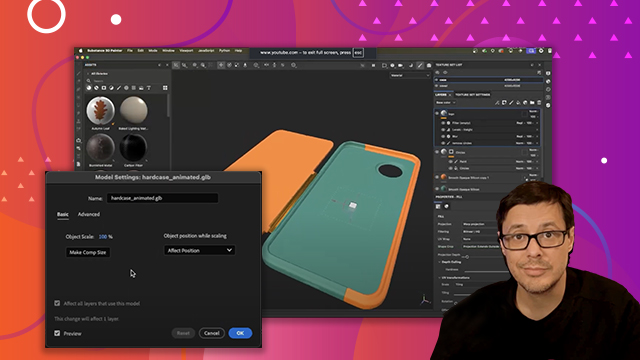
[00:00:00] see some color in my 3D view. And I have

[00:00:00] this new layer. This new layer is called

[00:00:00] a fill layer. This is that second type

[00:00:00] of material or excuse me second type of

[00:00:00] layer that I had mentioned earlier

[00:00:00] before we got into deep into the brush

[00:00:00] material settings here. So we have our

[00:00:00] paintable layer and now we have this new

[00:00:00] material called a fill layer. And

[00:00:00] essentially what it does is it takes our

[00:00:00] material channels and just fills them

[00:00:00] with information whether it be like a

[00:00:00] uniform color or some kind of data or a

[00:00:00] texture map just as long as it makes a

[00:00:00] material. That's all we really care

[00:00:00] about. So now I have this fill layer.

[00:00:00] Now what's interesting about this is I

[00:00:00] can start to work with this. Like I said

[00:00:00] this is a a procedural material in the

[00:00:00] sense that I can change parameters. So,

[00:00:00] first things first, if I come over here

[00:00:00] to my properties, you can see there's a

[00:00:00] couple options. We have this fill

[00:00:00] properties, which handles things like

[00:00:00] projection and tiling. So, for example,

[00:00:00] when you apply a material, you need to

[00:00:00] let Substance Painter know how you want

[00:00:00] that material projected onto the 3D

[00:00:00] model. And by default, it starts with

[00:00:00] this mode here called UV projection.

[00:00:00] Now, we talked a little bit about UVs

[00:00:00] when we first started the course. So

[00:00:00] again, I'm going to jump up here to the

[00:00:00] top of my toolbar, my little dropdown.

[00:00:00] I'm going to temporarily switch this to

[00:00:00] the 3D 2D view. And then if we zoom out,

[00:00:00] you can see this is that UV layout that

[00:00:00] this model had. So in this case, what's

[00:00:00] happening with the projection set to UV

[00:00:00] is I have presented painter. I said,

[00:00:00] "Hey, I have this material." And

[00:00:00] painter's like, "Oh, okay. I have this

[00:00:00] material. I'd like to apply it based on

[00:00:00] these UVs." So we could do that. Another

[00:00:00] option, let me quickly set that back to

[00:00:00] 3D view, would be to use this option

[00:00:00] here called tripplaner. So most of the

[00:00:00] time you're either going to use one of

[00:00:00] two things, UV or tripler. There's lots

[00:00:00] of other options. I don't even cover

[00:00:00] them in this course, but uh the like I

[00:00:00] said, the two main ones are going to use

[00:00:00] UV and triplaner. So if I drop here into

[00:00:00] tripplaner, what this does, and you can

[00:00:00] see if I zoom out, we have this

[00:00:00] manipulator with this box and tripplaner

[00:00:00] takes the material and it projects it

[00:00:00] onto the 3D surface across the X, Y, and

[00:00:00] Z axes. So basically projects it in 3D

[00:00:00] space. And then what's interesting is I

[00:00:00] can grab this little manipulator and you

[00:00:00] can see I can move this around to change

[00:00:00] the perspective. Now the difference is

[00:00:00] this. I would use tripplaner when I want

[00:00:00] to project a 3D object onto a surface

[00:00:00] and not have to worry about any seams.

[00:00:00] So in something like this where we've

[00:00:00] got, you know, kind of more of a

[00:00:00] rectangle kind of cube, it works

[00:00:00] perfect. If I had something like a

[00:00:00] complete round sphere, then it might

[00:00:00] give a little bit of issue. You'd see

[00:00:00] some blending around where the material

[00:00:00] is trying to blend itself. So in stuff

[00:00:00] like this, it works really well.

[00:00:00] However, if I jump over to my UVs, this

[00:00:00] also works really well, too. And the

[00:00:00] reason it does is because if I look at

[00:00:00] my 2D view, and I'm the one who did the

[00:00:00] unwrap, so I did it specifically so that

[00:00:00] I, you know, if I were to map something

[00:00:00] on the front or back of this cover, I

[00:00:00] could do so very easily. So, in this

[00:00:00] particular case, uh, of this 3D model,

[00:00:00] it doesn't really matter. And that's

[00:00:00] kind of one of the interesting uh topics

[00:00:00] about 3D is sometimes you don't know

[00:00:00] what you're going to get with 3D models

[00:00:00] and sometimes the UVs are not going to

[00:00:00] be in a good spot. They're going to be

[00:00:00] distorted or not look very well and it

[00:00:00] might make the textures look kind of

[00:00:00] weird on the surface. And if that

[00:00:00] happens, what I usually do in that

[00:00:00] scenario is I just quickly pop this down

[00:00:00] into trip planer. And like I said, most

[00:00:00] the time that's going to, you know, fix

[00:00:00] the situation. And of course you have

[00:00:00] this little manipulator. But at the top

[00:00:00] of my toolbar here I have some transform

[00:00:00] tools. So you'll see that I have like

[00:00:00] trans translate rotate and scale. So

[00:00:00] just to show you that really quickly. If

[00:00:00] I was in trip planer mode I could grab

[00:00:00] this rotation tool grab a 3D axis like

[00:00:00] like the Yaxis and I could rotate this

[00:00:00] guy. And now let's say if I want this

[00:00:00] material grain to kind of follow this

[00:00:00] direction. I can just quickly do that.

[00:00:00] And you can see I'm kind of using this

[00:00:00] very visual. But what you see is what

[00:00:00] you get kind of approach to texturing.

[00:00:00] So that's one way to work with

[00:00:00] triplaner. Let's pop this back over here

[00:00:00] to our UV and I could do the same thing.

[00:00:00] So again, if I look at this UV or excuse

[00:00:00] me 2D view and I have this manipulator,

[00:00:00] I could move this guy around and you can

[00:00:00] see how the projection is controlling

[00:00:00] again like I said how this material is

[00:00:00] showing up on the 3D surface. And if I

[00:00:00] move my mouse here outside of the little

[00:00:00] manipulator, I get these two little arc

[00:00:00] arrows. And if I just rotate, I could do

[00:00:00] the same thing. I'm holding down shift,

[00:00:00] do a little snap, and now this is

[00:00:00] aligning here as well. So, I'm kind of

[00:00:00] jumping into this a little bit of a deep

[00:00:00] dive just so you can kind of understand

[00:00:00] how this is uh overall. Let's say if I

[00:00:00] just go back and undo this to what we

[00:00:00] had at default. Let's close this back

[00:00:00] here to our 3D view. This is what we had

[00:00:00] by default. This is going to work pretty

[00:00:00] well. Now if I look at the scale of

[00:00:00] things and again this is just kind of

[00:00:00] how 3D is like the the material is

[00:00:00] designed so that hey it's seamless

[00:00:00] meaning that it can repeat across the

[00:00:00] surface and you know sometimes the 3D

[00:00:00] object size might be different than the

[00:00:00] material size and what do you do there?

[00:00:00] Well there's some specific scenarios

[00:00:00] where you can use something called

[00:00:00] physical size which could be really cool

[00:00:00] and again little bit of a complex topic.

[00:00:00] We won't cover it here but in my case I

[00:00:00] just want to be visual and just get

[00:00:00] things working. So we can, you know,

[00:00:00] it's a beginner level course, you know,

[00:00:00] let's just get something that looks

[00:00:00] pretty cool quick. We're going to leave

[00:00:00] it at UV. And here you'll see the

[00:00:00] section here for tiling. If I just come

[00:00:00] over here and I set this to, I'm just

[00:00:00] going to guess and say four. And we'll

[00:00:00] hit enter. There you go. I'm repeating

[00:00:00] that across the surface. Now it looks a

[00:00:00] little bit better, uh, more fine detail.

[00:00:00] And now I have something more in line of

[00:00:00] what I wanted to work with. Perfect. Now

[00:00:00] also like I said this is a procedural

[00:00:00] material so I can do some neat things

[00:00:00] here with some of the parameters like

[00:00:00] this particular material has some

[00:00:00] settings for like the grain. So if we

[00:00:00] look at this I can see there's some

[00:00:00] grain here on this surface. Now I can

[00:00:00] take this grain intensity. So just for

[00:00:00] me my my take on it is this is a little

[00:00:00] too intense. So I'm just going to drag

[00:00:00] this slider and push it down here closer

[00:00:00] to zero. And look at that. If I zoom in

[00:00:00] really close, I am seeing some detail

[00:00:00] here, but it's it's not, you know, super

[00:00:00] in my face, too intense. And maybe I

[00:00:00] maybe it's too too mellow right now. So,

[00:00:00] let's just intensify it a little bit.

[00:00:00] But this is what's cool about Painter is

[00:00:00] I can just take a visual kind of, you

[00:00:00] know, visual guess or tour of what I

[00:00:00] want to do with this material and just

[00:00:00] dial things up and down and make changes

[00:00:00] as I go. So, now we have our color. And

[00:00:00] if I click this color, it grabs this

[00:00:00] color picker and I can choose a color,

[00:00:00] which is pretty good. But Painter has

[00:00:00] this really neat feature with the color

[00:00:00] picker. Uh, so of course I could pick

[00:00:00] anywhere in the document. Like if I

[00:00:00] wanted to pick maybe this yellow, I

[00:00:00] could do that. Don't want that. So I'm

[00:00:00] going to undo it. But what's cool about

[00:00:00] Painter uh that I really like about the

[00:00:00] picker is that you can use this color

[00:00:00] picker and pick outside of the

[00:00:00] application. So, for example, I have a

[00:00:00] web page open using and I'm using Adobe

[00:00:00] color and I've created this little

[00:00:00] swatch here that I want to use. Now, if

[00:00:00] you want to have access to this, I've

[00:00:00] saved this in color themes. It's in the

[00:00:00] there's a color themes folder in the

[00:00:00] project files as a JPEG. So, you can

[00:00:00] have access to the these hexadimal

[00:00:00] numbers. So, if I wanted to, you know,

[00:00:00] of course, you could copy the value. I

[00:00:00] could come over here to the pick and I

[00:00:00] could paste it into here or this is what

[00:00:00] I use all the time. Like I said, I love

[00:00:00] this feature is I could grab here the

[00:00:00] color pick and I can move outside of the

[00:00:00] application and then choose whatever

[00:00:00] value I want. So in this case, I want to

[00:00:00] go with this orange. I'm just going to

[00:00:00] leftclick here and boom, you can see

[00:00:00] that it updates. Okay. So the next thing

[00:00:00] that we want to talk about is we have

[00:00:00] our material, but what really helps us

[00:00:00] to see our material is the lighting here

[00:00:00] that we have in our viewport. So, if I

[00:00:00] come over here to this bar, which is the

[00:00:00] display settings, we're going to open

[00:00:00] this up. And you'll see there's a

[00:00:00] section here in this window for

[00:00:00] environment map. Now, if I take this

[00:00:00] opacity, let me just increase this all

[00:00:00] the way to 100. Let's take this blur

[00:00:00] down. You can see there's this sphere

[00:00:00] mapped around the scene. And there is a

[00:00:00] texture map mapped to it. And this

[00:00:00] texture map is what's called a high

[00:00:00] dynamic range image. And all of the

[00:00:00] lighting in Substance Painter is coming

[00:00:00] from this HDR image. Now, if I want to

[00:00:00] change the lighting direction, what I

[00:00:00] need to do is change this environment

[00:00:00] rotation. So, if I move the slider, as I

[00:00:00] start to rotate the environment, you can

[00:00:00] see that the lighting is changing. Now,

[00:00:00] the way you're going to work with this

[00:00:00] every time is let's just take this

[00:00:00] opacity. Let's set it back to zero.

[00:00:00] We'll close this out. And I'm going to

[00:00:00] use a keyboard shortcut. So, if I hold

[00:00:00] down the shift key and use my right

[00:00:00] mouse button and I move left to right,

[00:00:00] you can see I'm now rotating that

[00:00:00] environment and thus changing the

[00:00:00] lighting direction. So, if I zoom in

[00:00:00] here on the cover and then I move my

[00:00:00] light around, now these little details I

[00:00:00] was talking about, they start to show up

[00:00:00] as the lighting direction changes. So,

[00:00:00] usually you'll do a tweak to your

[00:00:00] material. You'll hit shift right mouse

[00:00:00] button, move it around, get a good feel

[00:00:00] for how the lighting is interacting with

[00:00:00] the surface or more accurately said how

[00:00:00] the material is interacting with the

[00:00:00] light. And that'll help you gauge things

[00:00:00] like, you know, what do I set for this

[00:00:00] intensity value? You know what? I will

[00:00:00] just drop that grain intensity down a

[00:00:00] little bit.

[00:00:00] Now, another tip for working with the

[00:00:00] environment light. So, we have this

[00:00:00] cover and we want to maybe look at the

[00:00:00] other side. So, right now it's flipped

[00:00:00] open. Uh we need to use our navigation,

[00:00:00] our viewport. Let's flip around to the

[00:00:00] other side. However, it looks really

[00:00:00] dark. We're looking underneath the

[00:00:00] device and it looks really dark. And

[00:00:00] this is something you'll do a lot.

[00:00:00] You're kind of pivoting and moving

[00:00:00] around the 3D object and this is super

[00:00:00] annoying because of how dark it is.

[00:00:00] Well, what you can do is come over here

[00:00:00] to your display settings once again, and

[00:00:00] there's an option here for right

[00:00:00] underneath the rotation called

[00:00:00] environment alignment, and it's set to

[00:00:00] world by default. But what I usually do,

[00:00:00] or almost always do, is I just keep this

[00:00:00] set to camera. And what this means now,

[00:00:00] if we just go back and I adjust my

[00:00:00] light,

[00:00:00] the environment is going to align to the

[00:00:00] camera. So, if I'm here at the top,

[00:00:00] let's go ahead and set my light so that

[00:00:00] I can really see what I'm doing. and I

[00:00:00] flip around to the back side. Look, it's

[00:00:00] aligned to the camera. So, no matter

[00:00:00] which way I rotate, I'm gonna be able to

[00:00:00] see my details with the proper lighting

[00:00:00] angle. And this is what you're going to

[00:00:00] work with most of the time. Okay, one

[00:00:00] last thing. If we jump over here to

[00:00:00] display, when we're talking about our

[00:00:00] environment map, uh we can actually

[00:00:00] change this as well. So, if I click this

[00:00:00] button, this mini window pops up and I

[00:00:00] have lots of different options here. So,

[00:00:00] for example, if I change the environment

[00:00:00] map here, let's do a couple of these.

[00:00:00] Let's do cave entry forest. you're going

[00:00:00] to get different looks. So, again, I can

[00:00:00] move my lighting around. We'll click

[00:00:00] this button. Let's try something like

[00:00:00] this uh bus garage. Again, you're just

[00:00:00] going to get different looks. So, I'm

[00:00:00] going to set this back to this uh

[00:00:00] panorama, which is the default settings

[00:00:00] so that we're all on the same page. You

[00:00:00] could also, if you wanted to enable

[00:00:00] shadows, and this is going to uh appear

[00:00:00] or render some shadows in the scene. You

[00:00:00] might want to toggle this on and off

[00:00:00] every now and then, but but mostly I

[00:00:00] really don't use this because as you're

[00:00:00] working, it's just kind of flickering

[00:00:00] and getting in the way. So, I typically

[00:00:00] just uh turn this off here. All right.

[00:00:00] So, now we have everything set up. Let's

[00:00:00] take a look at the next thing we're

[00:00:00] going to do, which is add a metal

[00:00:00] material here for this hinge.