Home > Social Media and Final Export

Valentina Vee

Director, Cinematographer, and Editor

linkedin-icon

Social Media and Final Export

Master the process of adding and editing captions, including translating them for broader accessibility, to enhance your video’s reach. Learn to reframe content for social media platforms and export videos with burned-in captions for a professional, platform-ready final product.

This summary is AI generated

Learning Outcomes:

Learning outcomes not available.

Level: Beginner

Skills you'll gain:

Skills not available.

Key Insights

Key insights not available.

Learning outcomes

Learning outcomes not available.

Key insights

Key insights not available.

Skills

Skills not available.

Transcript

[00:00:00] then the outro animation remains and I

[00:00:00] think it's quite distracting. Welcome to

[00:00:00] my living room. I want to show you how I

[00:00:00] took it from looking like see that. So

[00:00:00] instead of making the clip shorter, I'm

[00:00:00] just going to cut the clip right there.

[00:00:00] So I just eliminate the outro animation.

[00:00:00] So both the lower third and me go away

[00:00:00] when I cut to the B-roll clip. I took it

[00:00:00] from looking like this to this.

[00:00:00] In my last video, that was more of a

[00:00:00] vlog. Let's add captions. And because we

[00:00:00] already have the transcript, adding

[00:00:00] captions will be a breeze. It's the same

[00:00:00] exact window as before. So, the text

[00:00:00] window, and you can see we're on the

[00:00:00] transcript tab, and we have the whole

[00:00:00] transcript here. But if we wanted to

[00:00:00] create captions, we just have to go to

[00:00:00] the caption tab and select create

[00:00:00] captions from transcript.

[00:00:00] It'll ask us what are our preferences

[00:00:00] for these captions. Personally, I like

[00:00:00] to do single line captions.

[00:00:00] And I want their minimum duration to be

[00:00:00] maybe 2 seconds cuz I want them to not

[00:00:00] anticipate the next thing I'm saying too

[00:00:00] quickly. I want the maximum length in

[00:00:00] characters to be well, let's do 40.

[00:00:00] Right now, we don't have a style set and

[00:00:00] the format is subtitle. So, with this

[00:00:00] information, we're going to click create

[00:00:00] captions.

[00:00:00] And there we go. All the captions are

[00:00:00] now on their own little track up here

[00:00:00] called the subtitle track. So, these

[00:00:00] captions are what's called burned in

[00:00:00] because they're on the video. It's not

[00:00:00] like you add them as an option later

[00:00:00] inside a video player. Um, we can adjust

[00:00:00] them though because this is the default

[00:00:00] look and color. So to adjust them, just

[00:00:00] click on any single one of them and that

[00:00:00] pops up their properties in the

[00:00:00] properties panel. You can add your

[00:00:00] favorite font.

[00:00:00] You can adjust the font size, although I

[00:00:00] kind of like the font size, the font

[00:00:00] color. So in this case, for the font

[00:00:00] color, I'm actually going to pick my

[00:00:00] skin color. For the shadow, I'm actually

[00:00:00] not going to have a shadow, but I would

[00:00:00] like a background. I'd like that

[00:00:00] background to be black and maybe have a

[00:00:00] little bit of corner, have a little bit

[00:00:00] more padding, something like that. Thus

[00:00:00] far, I've only adjusted this one

[00:00:00] singular caption, right? All of the

[00:00:00] other ones are the same. So, in order to

[00:00:00] push that look to the other captions,

[00:00:00] all I have to do is here under track

[00:00:00] style, press this button.

[00:00:00] And this is going to redefine the style

[00:00:00] of all the captions in the track to

[00:00:00] match this one. They are still a little

[00:00:00] bit too far. They're a little bit too

[00:00:00] low. So, I'm going to just select all of

[00:00:00] the captions and then use this align and

[00:00:00] transform control to move it up a little

[00:00:00] bit. Maybe the opacity of our background

[00:00:00] could be a little bit less.

[00:00:00] All right. Now, if you wanted to save

[00:00:00] this caption style and use it in the

[00:00:00] future, you could. You just go over here

[00:00:00] to track style to the plus button create

[00:00:00] style. For example, you're going to call

[00:00:00] it like soft captions because the color

[00:00:00] soft, the shape is soft. You can save to

[00:00:00] project and save to your local styles.

[00:00:00] You can see it put the soft captions

[00:00:00] caption file just in the regular folder.

[00:00:00] So, let's move that to our graphics

[00:00:00] folder. Now, we have these captions in

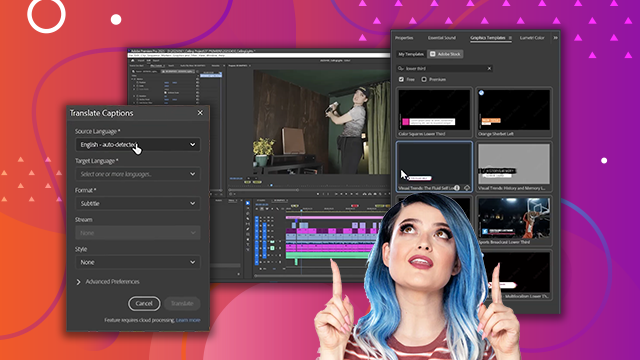
[00:00:00] English, but let's say that we wanted to

[00:00:00] translate them to another language for

[00:00:00] another video that we're making. So, we

[00:00:00] can go over here to this three dot

[00:00:00] button and go to translate captions.

[00:00:00] It auto detected that English is the

[00:00:00] language that we're working with. But

[00:00:00] our target language, let's just say it

[00:00:00] is just for accuracy. Let's go to

[00:00:00] another language that I speak, Spanish.

[00:00:00] Style, soft captions. Advanced

[00:00:00] preferences. We can do the same thing,

[00:00:00] right? Minimum duration in seconds,

[00:00:00] maximum length in characters is 40,

[00:00:00] single line and translate.

[00:00:00] You can see it will add another line of

[00:00:00] subtitles above our current subtitles.

[00:00:00] And then we can either hide or unhide

[00:00:00] them to see what language it is. So, for

[00:00:00] example, I can hide the English titles

[00:00:00] and I can turn on the Spanish ones. I

[00:00:00] had to figure out a way to trim that.

[00:00:00] And a friend of mine, he said, "Well,

[00:00:00] why don't you just use your jigsaw?" I'm

[00:00:00] like, "That's a great idea." Now that we

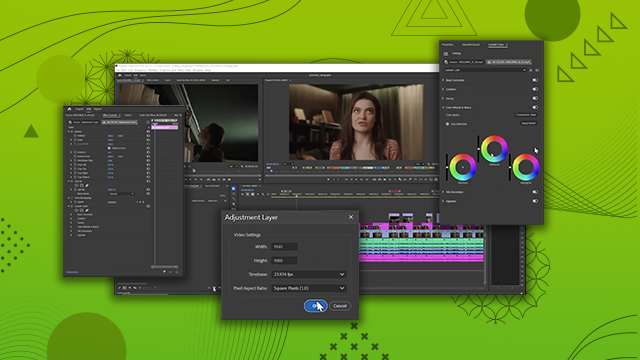
[00:00:00] have three tracks of video, an

[00:00:00] adjustment layer, a graphics layer, we

[00:00:00] also have two subtitle layers, it's

[00:00:00] getting to be a pretty hefty project,

[00:00:00] and it's not playing back as smooth as

[00:00:00] it was before. What helps is to be able

[00:00:00] to render the project. I think of

[00:00:00] rendering as almost like preheating the

[00:00:00] oven. So, it's easier to play back a

[00:00:00] clip if it's rendered first. And I'm

[00:00:00] sure you've noticed here above the

[00:00:00] timeline, we have a yellow

[00:00:00] line. That means this footage is likely

[00:00:00] to play back fine for you, but it might

[00:00:00] stall. If the line is red, then that's

[00:00:00] really difficult to play the footage

[00:00:00] back on your computer. You can always

[00:00:00] obviously drop down to like quarter

[00:00:00] resolution to play it back. But if you

[00:00:00] want to play it back at full resolution

[00:00:00] and your computer is not letting you, I

[00:00:00] would render first. You can either

[00:00:00] render the entire video or you can

[00:00:00] render a section of a video. For

[00:00:00] example, if I wanted to just render this

[00:00:00] jigsaw section over here, I can put my

[00:00:00] playhead where I need it. Put I for in,

[00:00:00] O for out. So, I've designated that this

[00:00:00] is the section that I want to render.

[00:00:00] over here to sequence render into out.

[00:00:00] And it takes a few seconds,

[00:00:00] but you can already see that that line

[00:00:00] is turning green, which means smooth

[00:00:00] playback. I recommend rendering the

[00:00:00] entire video before you export it. You

[00:00:00] can also change the subtitles after

[00:00:00] you've created them. You don't have to

[00:00:00] go all the way back to the transcript

[00:00:00] level. For example, over here, it

[00:00:00] actually skipped a word. He said, "Well,

[00:00:00] why don't you just use your jigsaw?" I'm

[00:00:00] like, "That's a great idea." I said,

[00:00:00] "I'm like, that's a great idea." So, I'm

[00:00:00] going to add a question mark. I'm

[00:00:00] like,

[00:00:00] and then because this was a quote

[00:00:00] quote. That's a great idea. So, I will

[00:00:00] go through this and clean up all of the

[00:00:00] captions so that they are accurate and

[00:00:00] then we will export. Before we go ahead

[00:00:00] and export and watch this, let's say you

[00:00:00] wanted a version for social media, a

[00:00:00] vertical version. How would you do that?

[00:00:00] You might rightclick, reveal sequence

[00:00:00] and project. Then duplicate this

[00:00:00] sequence.

[00:00:00] Then do 09 social.

[00:00:00] Open that up. And then go ahead and

[00:00:00] change the sequence settings. So, up

[00:00:00] here in sequence settings, instead of

[00:00:00] 1920x 1080, flip that around to 1080x

[00:00:00] 1920. Press okay

[00:00:00] and then see what happens. Oh, well, it

[00:00:00] just changed the sequence settings, but

[00:00:00] it didn't adjust the clips. Some of them

[00:00:00] might work, some of them don't.

[00:00:00] Sometimes I'm centered, sometimes I'm

[00:00:00] not. But regardless, all of these clips

[00:00:00] have to be refframed, right? So you

[00:00:00] would go to the first one, let's say a

[00:00:00] cam, and here under properties, you

[00:00:00] would scale it up,

[00:00:00] right? And what is that line right here?

[00:00:00] That is our adjustment layer. So you

[00:00:00] would scale up the entire adjustment

[00:00:00] layer as well.

[00:00:00] And then every single one of the B-roll

[00:00:00] clips, you would also have to reframe,

[00:00:00] resize.

[00:00:00] Takes a long time. So instead of doing

[00:00:00] all of that, there's an automatic way to

[00:00:00] do so. So I'm going to delete this

[00:00:00] entire 09 social delete. Go back to the

[00:00:00] latest version, which is 08 graphics.

[00:00:00] And instead, I'm going to go to

[00:00:00] sequence, auto refframe sequence.

[00:00:00] And here I can name it something. So I'm

[00:00:00] going to name it 09 social

[00:00:00] target aspect ratio vertical 9 by6 and

[00:00:00] then motion tracking. This is telling

[00:00:00] the software do you have a lot of very

[00:00:00] fast motion in this that it should be

[00:00:00] aware of for refframing purposes or do

[00:00:00] you have slower motion or should you do

[00:00:00] default? So I'll just do default. And

[00:00:00] then for clip nesting, this is like that

[00:00:00] Russian nesting doll thing where you

[00:00:00] have sequences inside sequences. I'm

[00:00:00] just going to say don't nest clips.

[00:00:00] Okay. And then I'm going to click

[00:00:00] create.

[00:00:00] Now, normally you would also do a

[00:00:00] shorter version for social, right? You

[00:00:00] would do like a 1 minute version of

[00:00:00] this. But just for argument sake, I want

[00:00:00] to show you how quickly this

[00:00:00] accomplished it. So you can see here it

[00:00:00] actually auto refframed everything so

[00:00:00] that

[00:00:00] the central action is happening in the

[00:00:00] center. Remember here if I reveal in

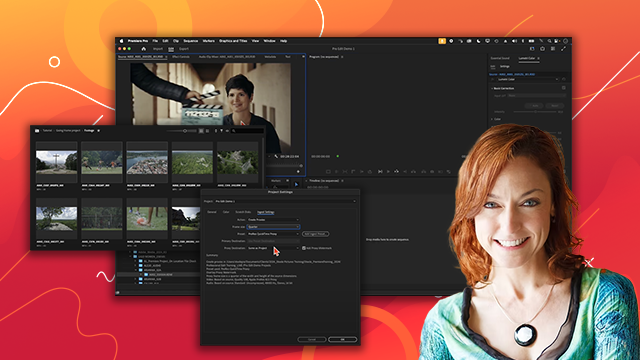
[00:00:00] project

[00:00:00] I was actually in this portion of the

[00:00:00] clip I was to the right side of the clip

[00:00:00] but it auto refframed me in the middle.

[00:00:00] Sometimes it doesn't get it perfectly

[00:00:00] right. Like in this example it focused

[00:00:00] on my face but I really want it to focus

[00:00:00] on the actual nailing of the nails. So,

[00:00:00] I'm going to select that clip, go to

[00:00:00] auto refframe, and then adjust the

[00:00:00] offset of the auto refframe by dragging

[00:00:00] this X value to the left.

[00:00:00] There we go. Cuz I want to focus on the

[00:00:00] hammering. Okay, are you ready to

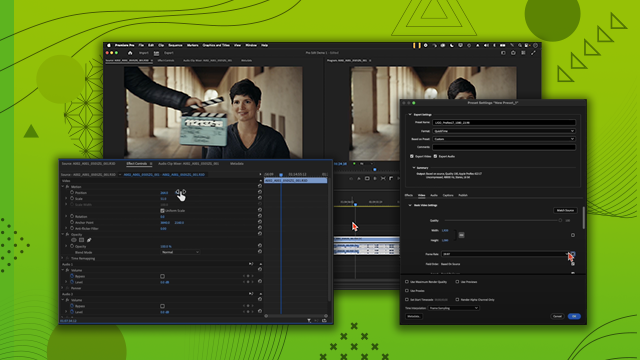
[00:00:00] export? We will go to file, export,

[00:00:00] media, or controlM. We'll find the

[00:00:00] destination. So, it should be in the

[00:00:00] exports folder on our drive. Make sure

[00:00:00] that the preset here is highquality

[00:00:00] 1080p HD. And let's name it 2025

[00:00:00] 0501

[00:00:00] molding underscore

[00:00:00] subs cuz we're adding subtitles

[00:00:00] underscore horizontal.

[00:00:00] What's important here also is here under

[00:00:00] captions you make sure that this caption

[00:00:00] checkbox is enabled because if it isn't

[00:00:00] then you won't have the captions track

[00:00:00] and then your export option are either

[00:00:00] burn captions into video or create

[00:00:00] sidecar file. So this is the file that

[00:00:00] you can upload to like the back end of

[00:00:00] YouTube but in this case we want to burn

[00:00:00] the captions into the video entire

[00:00:00] source and click export.

[00:00:00] Congratulations, we're at the end of the

[00:00:00] tutorial. I'm about to play the final

[00:00:00] video for you. Don't forget that there

[00:00:00] are resources in the description,

[00:00:00] including a PDF booklet that I wrote

[00:00:00] that has a lot of this information in

[00:00:00] very easy to read terms. Thank you so

[00:00:00] much for trusting me with your Premiere

[00:00:00] Pro education, and I hope you learned

[00:00:00] something new.

[00:00:00] Once again, if you want to connect with

[00:00:00] me, here are my social media profiles,

[00:00:00] and let's not waste any more time. Let's

[00:00:00] watch the last video. Welcome to my

[00:00:00] living room. I want to show you how I

[00:00:00] took it from looking like this to this.

[00:00:00] In my last video that was more of a

[00:00:00] vlog, I showed you how I did the track

[00:00:00] lighting in the ceiling. But as much as

[00:00:00] I love light strips, I don't love

[00:00:00] looking at them. I like the effect they

[00:00:00] make. You can see here on the curtains,

[00:00:00] it just highlights those folds and makes

[00:00:00] it really lush and cinematic. In this

[00:00:00] video, I want to talk a little bit about

[00:00:00] my crown molding balance project.

[00:00:00] Usually, people put LED light strips

[00:00:00] that face the ceiling and they put their

[00:00:00] molding on the wall and I decided to put

[00:00:00] my molding on the ceiling and put the

[00:00:00] LED light strips pointed down the wall.

[00:00:00] First, I found crown molding that was

[00:00:00] actually made of styrofoam, which was

[00:00:00] great because I knew that I would have

[00:00:00] to be putting it on the ceiling. I just

[00:00:00] didn't want to overload the ceiling with

[00:00:00] too much weight because there's already

[00:00:00] curtain tracks on it. This crown molding

[00:00:00] came in giant 8ft strips and the corners

[00:00:00] were already mitered, meaning they were

[00:00:00] already at 45°. So using a hacksaw, I

[00:00:00] cut each piece into two so I would have

[00:00:00] eight halves so I could put together the

[00:00:00] corners first. And then I noticed that I

[00:00:00] didn't really have a good point of

[00:00:00] contact. This crown molding is meant to

[00:00:00] go on the wall and on the ceiling. So it

[00:00:00] has three attachment points to where it

[00:00:00] goes on the wall and one attachment

[00:00:00] point to where it goes on the ceiling.

[00:00:00] Well, because I was only using the

[00:00:00] ceiling, that is not enough surface area

[00:00:00] for me. So, I had to figure out a way to

[00:00:00] trim that. And a friend of mine, he

[00:00:00] said, "Well, why don't you just use your

[00:00:00] jigsaw?" I'm like, "That's a great

[00:00:00] idea." So, we figured out a way to move

[00:00:00] the crown molding against the jigsaw to

[00:00:00] get these perfect cuts so that I had

[00:00:00] more surface area on the top of the

[00:00:00] crown molding so that I could adhere it

[00:00:00] to the ceiling. How do I adhere it to

[00:00:00] the ceiling? I tried to do it in my

[00:00:00] garage with a couple of scraps. The

[00:00:00] first thing I tried was a glue that's

[00:00:00] specific for styrofoam and it actually

[00:00:00] really sucked. It didn't work at all. So

[00:00:00] then I tried uh caul, just regular caul.

[00:00:00] And it worked okay, but I thought, okay,

[00:00:00] I could reinforce it with a nail gun.

[00:00:00] Well, the nail gun didn't work at all.

[00:00:00] It's a lot easier to paint crown molding

[00:00:00] on the ground than to paint it on the

[00:00:00] ceiling. So before mounting each piece,

[00:00:00] I actually went ahead and painted it.

[00:00:00] One thing about the painting was that

[00:00:00] because there were so many styrofoam

[00:00:00] pieces, they just kind of got

[00:00:00] everywhere. So before painting a piece,

[00:00:00] I would take a rag and just sort of swat

[00:00:00] off the styrofoam to make sure that none

[00:00:00] of it got caught in the paint. The first

[00:00:00] piece went over my front door. And I

[00:00:00] tried to do it with only just like

[00:00:00] the manufacturer said to do except it

[00:00:00] kept falling. So I took two seastands to

[00:00:00] hoist it up there and hold it up there.

[00:00:00] Well, they actually created dents in the

[00:00:00] molding. So for the second piece, I

[00:00:00] decided to put tennis balls on the end

[00:00:00] of the stands and hold it up that way.

[00:00:00] It was just taking way too long. And I

[00:00:00] was racking my brain and thinking, "Oh

[00:00:00] my god, is it going to take me like 8

[00:00:00] days just to put these corners up?" And

[00:00:00] then I realized nails exist. Just

[00:00:00] regular finishing nails. So even though

[00:00:00] it was tedious, I nailed each piece in.

[00:00:00] And of course, where the joints meet, I

[00:00:00] added extra coaul and I tried to smooth

[00:00:00] it out as much as I could. As I kept

[00:00:00] going, I kept getting better. After I

[00:00:00] glued all of the corners and reinforced

[00:00:00] it with nails, it was time to figure out

[00:00:00] how to do the middles. And instead of

[00:00:00] measuring, I actually just held up other

[00:00:00] pieces of the styrofoam and I marked

[00:00:00] where to cut with a pencil. I took my

[00:00:00] hacksaw and I cut off those ends.

[00:00:00] Obviously, painted them, stuck them on,

[00:00:00] nailed them in, and tried to the

[00:00:00] seams as best as I could. The white

[00:00:00] needed to be painted, and of course, it

[00:00:00] was three coats of paint, but I got it

[00:00:00] done, and now I get to relax in my

[00:00:00] beautiful living room. I also did a few

[00:00:00] other things like swapped out some

[00:00:00] curtains, swapped out the rug, added a

[00:00:00] mirror, and I'm waiting on the last

[00:00:00] piece, which are these beautiful dark

[00:00:00] wood bookshelves that are going to go

[00:00:00] floor to ceiling along this wall over

[00:00:00] here. Uh, they're just going to come in

[00:00:00] 2 to 4 months. Thanks for watching. I

[00:00:00] hope this inspired you to do your own

[00:00:00] DIY project. Until next time. Bye.